macOS + WINDOWS AT LAUNCH · BUILT FOR ADHD WORKDAYS
Your workday,without the loose ends.
Work by WanderMind is a calm, local-first workspace for office professionals with ADHD. Capture meetings, turn them into next steps, and focus on one thing at a time.
✓ One-time purchase✓ Your meeting data stays local✓ Use on 2 systems at once
Created by a person with ADHD.Made in Germany.
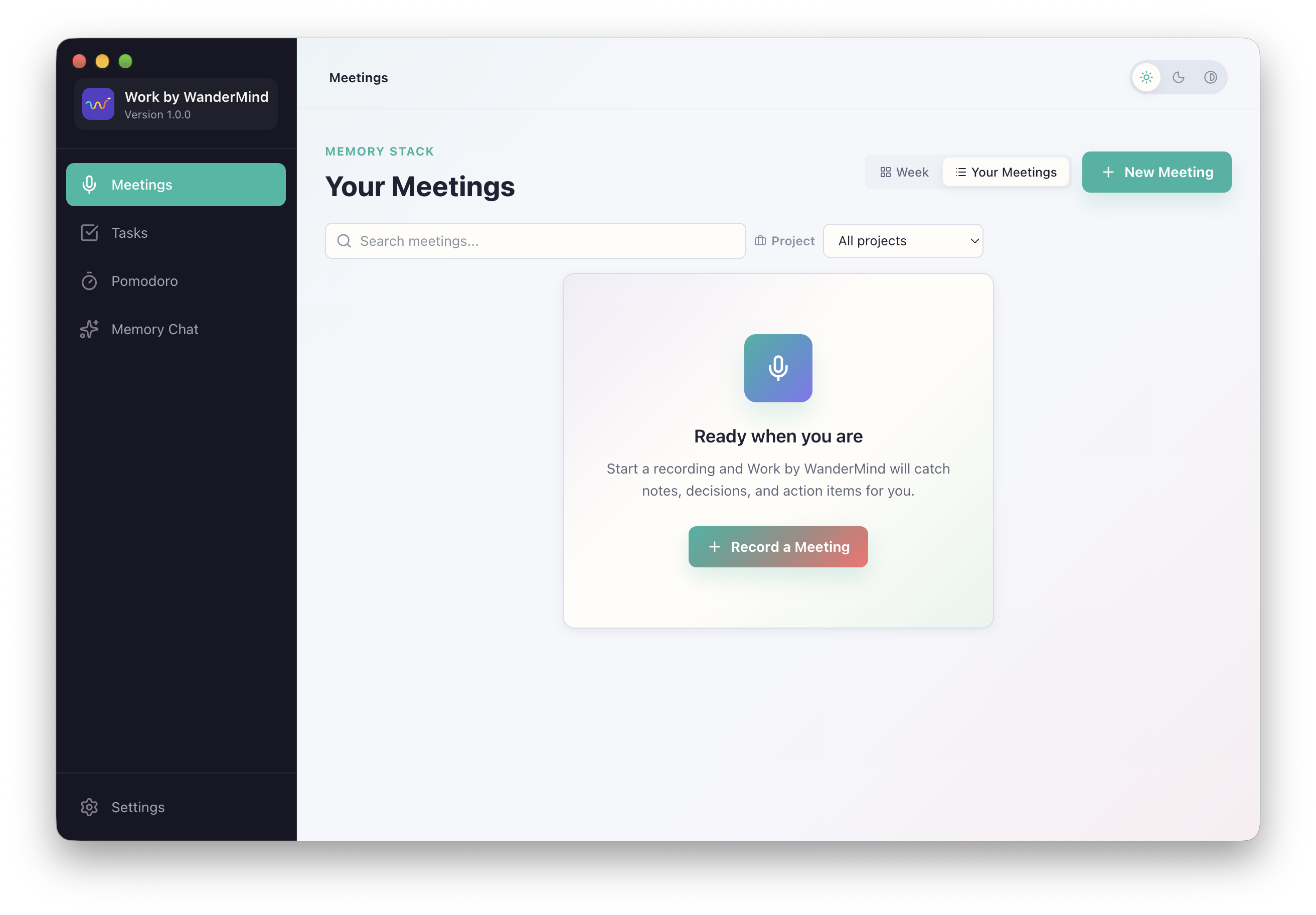
Actual macOS app · English interface
MEETINGS · TASKS · FOCUS
From the meeting to your next step.
01
Revisit the meeting
Record a meeting and turn it into a local transcript with an editable summary. Keep notes, decisions and action points alongside the recording.
02
Turn decisions into tasks
Review the suggested tasks and add them to your list, linked to their meeting and project. Break larger tasks into smaller steps.
03
Focus on the next step
Choose a task and start a visual Pomodoro timer. Alternate focus sessions with short or long breaks and see your completed sessions for the day.
Find an earlier decision
Search meetings, notes and tasks with local AI. Filter by project and check the sources behind each answer.
Adjust your workspace
Adjust text size, contrast, theme and motion. Your work saves automatically; notifications are off by default.
Only record meetings with participant consent and in accordance with workplace policies.
PRIVATE WORK SHOULD STAY PRIVATE
Your meetings do not need a trip to the cloud.
Work keeps its core data in a local database. Transcription, summaries, speaker recognition, and chat are designed for local models on your computer - giving you a private workflow you can inspect and control.
Local-first, not mysterious.AI output stays editable. Project answers show their local sources. You remain in control of recording, corrections, and deletion.
01
You start every recording
The optional reminder never records automatically.
02
Interrupted recordings can recover
Local recovery copies protect work through crashes and sleep.
03
Your archive is portable
Export a ZIP backup including available meetings, tasks, settings, and audio.
04
Old audio can clean itself up
Optionally delete audio after 30 days once transcription is complete.
FROM LIVED EXPERIENCE
By a neurodivergent person. For neurodivergent people.
Work by WanderMind is created by a person with ADHD, for neurodivergent people. The idea comes from lived experience with the office workday: fleeting thoughts, lost context and the challenge of getting started. That perspective shapes a calmer way to work — without expecting every brain to work the same way.
MADE IN GERMANY, EUROPE
Built in Germany. Close to the everyday.
WanderMind is an independent German business based. Work is developed in Germany — with a focus on local data, thoughtful design and direct email support in English and German.
ONE PRICE. YOUR WORKSPACE.
Buy it once. Keep your version.
Try Work free for 14 days. Pay once for a perpetual licence to the purchased major version and use the app on up to two systems at the same time.
WORK BY WANDERMIND
Perpetual licence
34.99 USDone time
International price · One-time payment
✓ 14-day free trial
✓ One-time purchase, no subscription
✓ Keep the purchased major version
✓ Use on up to 2 systems simultaneously
✓ macOS and Windows at launch
✓ Local-first data and AI workflow
✓ Free fixes and minor updates within your major version
✓ Email support in English and German
Future major versions may be sold separately. Upgrading is optional. Statutory rights and required updates remain unaffected. Update and support details
Please note: app downloads are not available yet. Both platforms are planned for launch.
Everything you need to know about your trial, licence, privacy and support.
01Is Work by WanderMind a subscription?+
No. You pay 34.99 USD once for a perpetual licence to the purchased major version, with no recurring subscription. You can use it on up to two systems simultaneously. Future major versions may be sold separately; upgrading is optional and does not end your licence to the purchased version.
02Which updates are included?+
Bug fixes and minor feature updates within your purchased major version are free, for example updates from 1.0 to 1.1 or 1.9. A future major version such as 2.0 may be a separate, optional purchase. This does not limit legally required updates, including security updates, or your statutory rights. A new major version does not automatically end those obligations.
03What support is included?+
Email support in English and German is included for installation, activation and technical problems. We aim to reply within three business days, Monday to Friday; this is a target, not a guaranteed response or resolution time. Contact support@wandermind.app. Phone support, individual setup, training and guaranteed implementation of feature requests are not included. Your statutory rights remain unaffected.
04Will every future operating-system version be supported?+
We will publish the supported macOS and Windows versions before launch and update the compatibility information as it changes. We do not promise compatibility with every future operating-system version. This does not restrict statutory rights or required updates.
05How does the 14-day trial work?+
Try Work on macOS or Windows free for 14 days before buying. The trial downloads are not available yet; both versions are planned for launch. Check the download section for availability.
06Does my meeting data leave my computer?+
Meeting data is stored locally. Transcription, summaries, and chat are designed to run with local models, so normal local use does not require sending meeting content to an external AI service. Local-first does not mean entirely offline: purchases and online licence checks use external services. See our privacy policy for information about the website and checkout.
07Will it start recording meetings automatically?+
No. The optional macOS assistant can recognise a likely meeting using the active native meeting app and microphone activity, then remind you. You still explicitly choose whether and how to record.
08Which operating systems will be available at launch?+
Work will launch for both macOS and Windows. Minimum operating-system versions, supported processors, memory requirements, download sizes and platform-specific feature details will be published before launch.
09How many systems can I use at the same time?+
Your licence lets you use Work on up to two systems at the same time. Details on activation and switching systems will be published before launch.
 Made in Germany.
 Workby WanderMind